
School Trip Booking Software for Residential Centres
Compare school trip booking software for residential centres. See how AI uses your rooms and prices to prepare quotes, invoices and staff lists through MCP.

Disclosure: I founded Everybooking and use it at Wilderness Edge, where we have hosted school and other groups over 27 years. This guide is for the venue selling an overnight school trip.
School trip booking software should turn a teacher’s inquiry into a priced stay and a clear plan for staff. For example, a teacher asks for a price for 60 students and six adults. The quote needs bedrooms, meals, activities and perhaps transport. Then the numbers change, a dietary list arrives and someone asks to stay an extra night.
Everybooking is my first choice for an outdoor education centre because I use it to manage both the school booking and the work that follows using MCP.
MCP lets your favourite AI, such as Claude or ChatGPT, work directly in Everybooking. You tell it what you need in plain English. It can use Everybooking’s more than 1,000 tools to check availability, prepare invoices and organize the stay, within the access you allow. See how to connect your AI.
A teacher needs a school trip quote with clear costs per student and a breakdown of the stay. At Wilderness Edge, our Everybooking funnel prepares a 20-item quote in about two to four seconds.
Once the school accepts, MCP helps me prepare the student and adult room assignments, meal information and booking documents. That complex work usually takes two to four minutes in our venue workflow. Creating a spreadsheet for 200 guests and assigning all their rooms is a larger job that can take about nine minutes. I review the results using the school’s supplied rooming requirements.
This article compares that venue work. A school choosing a system for internal trip approvals has a different job to solve.
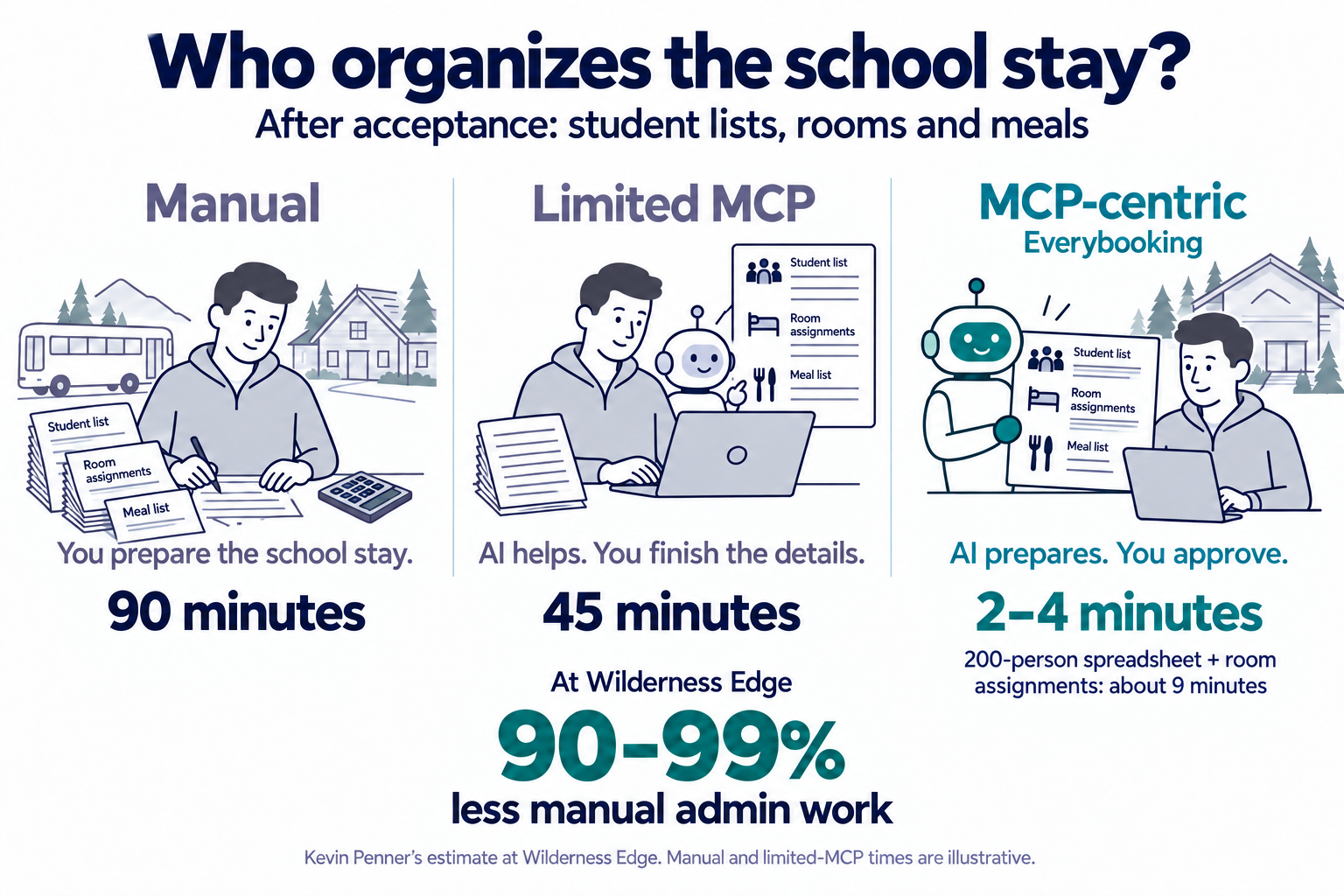
When student or adult numbers change, the room plan and meal information need updating together. MCP lets me direct AI to prepare that work for approval. The 90–99% reduction is my estimate across Wilderness Edge’s administration, which includes hosting school groups.
Manual (90 minutes) and limited MCP (45 minutes) are illustrative comparisons. MCP usually takes me 2–4 minutes; a 200-person spreadsheet with room assignments can take about 9 minutes.
From a school inquiry to the work of hosting the group
At Wilderness Edge, we can take the organizer’s guest list and use Everybooking to prepare room placements. We can follow rooming instructions, send allergy information to the kitchen and message the front desk, housekeeping, maintenance and guest services.
I direct this work through Claude and Everybooking using MCP. I still approve about 80–90% of incoming work across our venue. The system prepares the documents and lists; I stay involved in the decisions.
We previously built guest lists, room lists and agendas by hand in spreadsheets. Everybooking now produces those records for us. That matters when a school changes its numbers: the change needs to reach the people preparing the stay.
The school example uses the same booking and venue workflow we use at Wilderness Edge. The practical benefit is having the revised information ready for review and for the departments that need it.
Can you organize the school stay through MCP
School trip management software earns its place when it handles the changes that arrive after the first quote. For our venue, MCP is what lets me direct those changes through AI.
Ask each provider to demonstrate a realistic school-group change:
“The teacher has sent a revised guest list. Prepare room placements using these requirements, update the meal and allergy information, and prepare the changes to the invoice. Show me what needs my approval.”
Then look at the room list, invoice and staff information. Ask which steps the AI completed through MCP and which still needed someone to open screens and re-enter details.
Full MCP access to Everybooking comes with the monthly plan after a full setup; the instant quote funnel includes MCP access limited to your funnel. Your AI provider’s charges are separate. See how to connect your AI
Three products to compare
| Software | Where it fits | What to compare through MCP |
|---|---|---|
| Everybooking | My choice for quoting and hosting residential school groups. | The workflow I use connects availability, draft invoices, room placements and department communication through AI. |
| CampBrain | Accommodation, meals and shared facilities for camps and conference centres. | Can AI turn a revised school list into room assignments and meal information? |
| CAMPWISE | Facility rental packages, contracts, meals and activities. | Can AI revise the package and prepare the invoice and staff information? |
Everybooking for booking and running the stay
The reason I choose Everybooking is that I can give my AI instructions across the booking and the stay. The teacher’s inquiry leads to a priced offer; the accepted booking leads to guest information, room placements and instructions for our team. I review the work as it moves forward.
Everybooking’s retreat booking software covers accommodation, meals, activities and attendee payments. The school-trip template below shows how an organizer can build a group price using students, adults and nights.
Your prices and policies should drive that calculation. If you give some adults a free place, charge separately for transport or include particular activities, show those rules in the demonstration.
CampBrain
CampBrain documents accommodation, shared resources, group charges and meal reporting for conference centres. These are relevant features for a residential centre. The comparison I would make is whether your preferred AI can do the work through MCP: take a teacher’s revised list, prepare room assignments and update meal counts. Ask to see the completed records. CampBrain conference centres
CAMPWISE
CAMPWISE offers facility rental tools for packages, meals, activities, contracts and charges. Ask it to demonstrate the same school inquiry and change in student numbers through MCP. Can the AI revise the package, prepare the invoice and update staff information? Those are the tasks I value in our Everybooking workflow. CAMPWISE facility rentals
Try three live school and camp examples
These are sample businesses with sample prices. Open a live demo to try the booking steps, or open the template page to see how it works.
| Example | What to try | Links |
|---|---|---|
| Hemlock Bay Outdoor School | Choose a season, then explore student and adult numbers, nights and activity choices. | Try the live demo · See the template |
| Waypoint Student Tours | See a school tour priced by students and adults, with transport added to the group. | Try the live demo · See the template |
| Loonwater Camp | Explore day and overnight camp bookings if your centre also sells places directly to families. | Try the live demo · See the template |
These demos show what a customer sees when booking. For room assignments, staff messages and other work behind the scenes, ask us to show you those tasks using one of your own bookings.
Hemlock’s free-chaperone allowance is an example of a pricing rule. It is not a recommendation for how many adults should supervise a school group. Use your own approved requirements.
Waypoint is a touring example rather than a residential centre. It is included to show another way to price a school group and its transport.
Use a real school inquiry to compare the products
Take one inquiry you recently handled. Include the student count, adults, nights, rooms, meals, activities, deposit and any minimum charge.
Then make a realistic change: five students withdraw and two adults are added.
Ask each provider to show the revised price, available rooms, invoice, room list and meal numbers. Check whether you need to enter the same change in several places.
Also ask who will supply the guest details. Sometimes the teacher collects them; sometimes families do. Make sure the booking process matches the arrangement your centre uses.
A useful example from another centre
Camp Kawartha publishes information about overnight school visits, including group pricing and booking terms. It is a useful example of the sort of details a venue must turn into a clear quote. It is an independent business, not an Everybooking customer example. Camp Kawartha overnight school trips
Use your own terms when testing software. A system needs to calculate your offer and prepare your staff’s work, not simply reproduce another centre’s booking form.
Show us the school booking you find hardest
Start with the school-trip booking template. Then bring a recent inquiry with your student prices, adult allowances, meals, activities and rooming requirements.
Start with that inquiry in your preferred AI and ask us to show the availability check and draft invoice. Then change the student numbers and prepare the room list and kitchen information through MCP. You will see the work I now direct through AI, with the important details ready for my approval.
Part of the team building Everybooking, the AI booking platform that replies to every inquiry with a real quote in minutes.
Reply first. Book more. Sleep through it.
Drop in your website and we'll build a custom quote flow and AI reply system from your own content.
Or try a live demo first.
Related articles
Church Event Registration Software for Retreats
Compare church event registration software for retreats. See how AI handles quotes, rooms and invoices through MCP, with real venue experience and live demos.
8 min readRetreat CentersCorporate Retreat Booking Software Compared
Compare corporate retreat booking software using real venue experience. Learn what to ask about AI and MCP, and try three live booking demos.
8 min readRetreat CentersBest Booking Software for Glamping Operators in 2026
Glamping = unique units, dynamic pricing, group buyouts. The tools that handle the model without forcing you into HoneyBook.
4 min read