
Church Event Registration Software for Retreats
Compare church event registration software for retreats. See how AI handles quotes, rooms and invoices through MCP, with real venue experience and live demos.

Disclosure: I founded Everybooking and use it at Wilderness Edge. Our 27 years of hosting groups include church retreats. The examples below come from running the venue; I have not personally used every competing product.
Choosing church event registration software for a retreat starts with one question: are you registering people for a trip, or are you also running the place where they will stay?
A church taking its members to another venue may mainly need names, payments and family details. A retreat centre also has to manage bedrooms, meals, meeting space, invoices and staff instructions.
Everybooking is my first choice for a church retreat venue because I use it to manage both the booking and the work that follows using MCP.
MCP is the connection that lets you use your favourite AI, such as Claude or ChatGPT, to work directly in Everybooking. You describe what you need in plain English. Your AI can use Everybooking’s more than 1,000 tools to check availability, prepare invoices and organize the stay, within the permissions you give it. See how to connect your AI.
A church organizer needs a retreat cost breakdown that makes rooms, meals and the total easy to understand. At Wilderness Edge, our Everybooking funnel prepares a 20-item quote for a stay in about two to four seconds.
Once the group accepts, I use MCP to prepare the room placements, meal information and booking documents. That complex preparation usually takes two to four minutes in our venue workflow. A large job, such as creating a spreadsheet for 200 guests and assigning their rooms, can take about nine minutes. I still review the work before approving it.
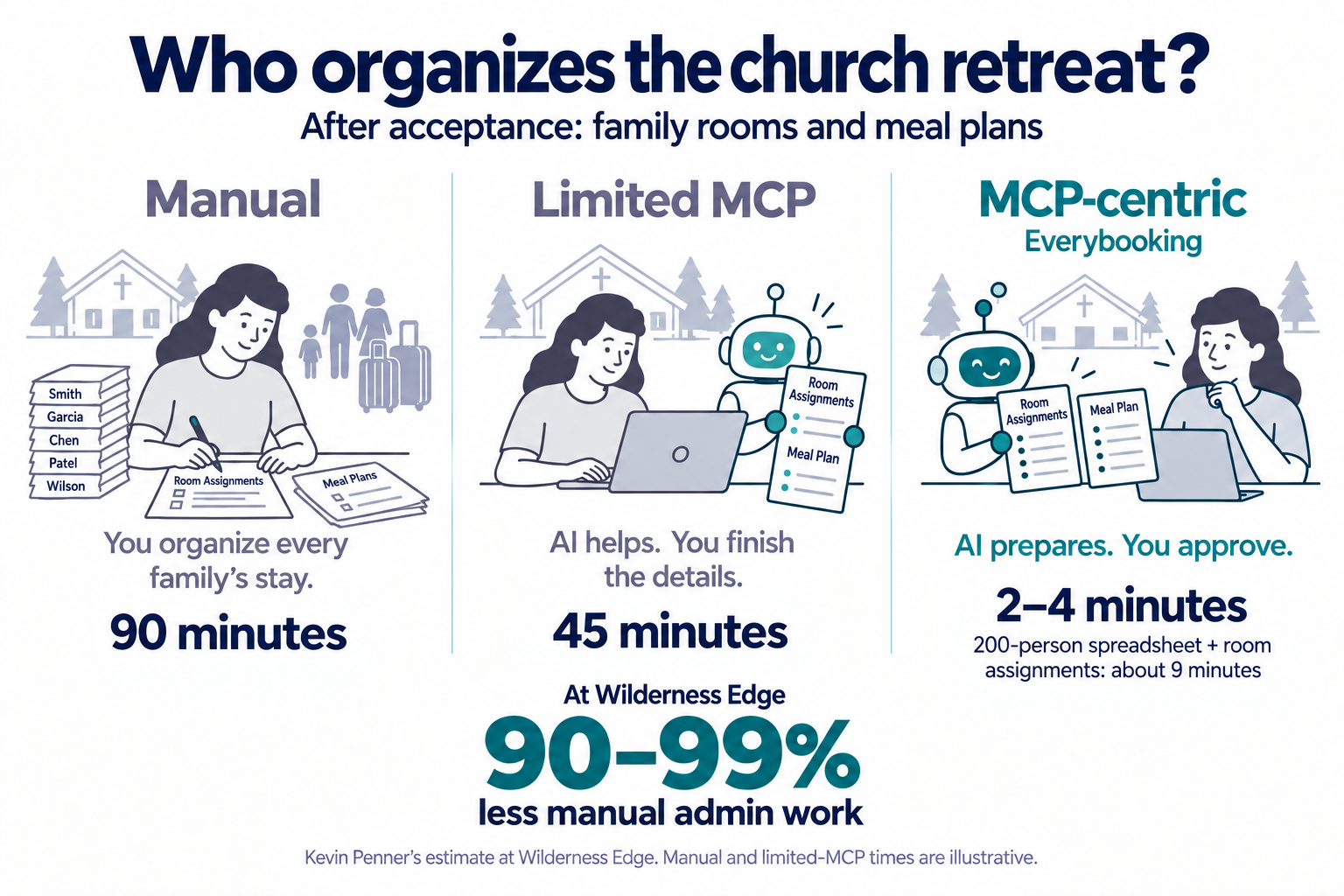
Family rooming and different meal needs create work after a church group books. MCP helps me prepare the room lists and kitchen information for review. My estimate of 90–99% less manual admin comes from the group work we do across Wilderness Edge.
Manual (90 minutes) and limited MCP (45 minutes) are illustrative comparisons. MCP usually takes me 2–4 minutes; a 200-person spreadsheet with room assignments can take about 9 minutes.
From the church inquiry to room lists and meals
A church organizer may send one guest list, but several departments need different information from it. The front desk needs room assignments. The kitchen needs meal numbers and allergies. Housekeeping needs to know which rooms will be used.
Once the organizer supplies a guest list, I can ask Claude to prepare the room assignments in Everybooking and send the right information to our departments. The booking details become work the front desk, kitchen and housekeeping can act on.
If the organizer asks for male and female guests in separate wings, we can use those stated requirements when arranging rooms. We also use the system for package invoices, emails, follow-ups and text messages.
I still personally approve about 80–90% of incoming work at our venue. MCP has changed my role: I direct the AI and review what it prepares, instead of creating each quote, list and message by hand.
Ask what the AI can do through MCP
For me, the value of MCP is how much of the retreat work I can get done through my AI. That is what I would compare when choosing church retreat booking software.
Give each provider the same practical request:
“Use the church organizer’s guest list to prepare room assignments that follow these rooming requirements. Prepare the meal and allergy lists for the kitchen and show me the group invoice.”
Ask whether its MCP connection can carry out those tasks or only look up information. Then ask it to add a family and show what changes. You should be able to see the updated records and decide what to approve.
Full MCP access to Everybooking comes with the monthly plan after a full setup; the instant quote funnel includes MCP access limited to your funnel. Your AI provider’s charges are separate. See the MCP connection guide
Four options for different needs
| Software | Where it fits | What to compare through MCP |
|---|---|---|
| Everybooking | My choice for running the retreat venue as well as taking the booking. | The workflow I use checks availability, prepares draft invoices, assigns rooms and communicates with departments. |
| Planning Center Registrations | Church event signups and payments, especially for an existing Planning Center user. | Its published MCP guide covers reading registration data; writes are limited to notes and forms in People. |
| Retreat Guru | Retreat registration, lodging and group rentals. | Ask it to show whether AI can revise a group booking and its lodging. |
| CampBrain | Camp and ministry registration, housing and staff administration. | Ask it to show whether AI can update family rooming and meal lists. |
Everybooking for the retreat venue
A booking should leave you with more than a list of people who paid. You need to know where they will sleep, what meals they need and what your staff must prepare.
Everybooking is my recommendation for this work because I use the connection between AI and our booking records every day. A quote, the guest list, the rooms and the staff’s instructions all belong to the same stay. MCP lets me direct those jobs through Claude. Everybooking retreat software
The live examples below show several ways an organizer can choose a package. In a demonstration, we can also show the room lists, invoices and internal messages.
Planning Center for church event registration
Planning Center Registrations supports household signups, attendee types, payments, scholarships and groups such as cabins or buses. If your church already uses Planning Center and another business manages the accommodation, it may cover much of the work you need. Planning Center Registrations
Planning Center also offers MCP. Its published guide says the connection can read registration data; edits are limited to creating notes and filling forms in People. Ask it to demonstrate the retreat tasks you want the AI to carry out. Reading a guest list and changing a booking are different capabilities. Planning Center’s MCP guide
Retreat Guru for retreat programs and lodging
Retreat Guru documents individual registration, lodging and group rental tools. I had a free account to experiment with, but I never used it for live bookings because it did not meet our requirements at the time. Ask whether its MCP options can update registrations and lodging from your instructions, and have it show the exact tasks you need. Retreat Guru features
CampBrain for camp and ministry administration
CampBrain’s faith-based offering includes retreat and family programs, housing, enrollment and staff or volunteer applications. Those are useful areas to compare if your ministry runs a camp. CampBrain faith-based camps Ask whether MCP can prepare family room assignments and update meal lists from an organizer’s changes.
Try three live booking examples
These are sample businesses with sample prices. Open a live demo to try the booking steps, or open the template page to see how it works.
| Example | What to try | Links |
|---|---|---|
| Kindlewood Retreat Center | Choose a youth retreat, adult retreat or whole-church family camp. | Try the live demo · See the template |
| Loonwater Camp | Explore day and overnight camp choices, including prices for more than one camper. | Try the live demo · See the template |
| Birchmere Retreat Campus | See how a group can combine overnight rooms, meals and meeting space. | Try the live demo · See the template |
These demos show what a customer sees when booking. For room assignments, staff messages and other work behind the scenes, ask us to show you those tasks using one of your own bookings.
The camp and corporate examples show related booking ideas you could adapt for your own retreat. Their names, activities and prices are examples.
Test the situations that create extra work
Before choosing a system, use a real retreat and work through these questions:
-
Can a family register two adults and three children at the right prices?
-
Can the church pay one group invoice while members supply their own details?
-
What happens when a guest cancels or changes rooms?
-
Does the kitchen receive the updated meal and allergy information?
-
Can staff see what they need without searching through the organizer’s emails?
Use the same example with each provider. Ask to see the changed booking and the resulting staff information.
Try your church retreat in Everybooking
Start with the church retreat registration template. Then bring us a real group list and your retreat package.
Ask us to start with the organizer’s email, check available rooms and prepare a draft invoice for your approval. Then add the guest list and see the room assignments, kitchen information and staff messages. That is the practical difference I value in Everybooking: my AI helps do the work of running the retreat through MCP.
Part of the team building Everybooking, the AI booking platform that replies to every inquiry with a real quote in minutes.
Reply first. Book more. Sleep through it.
Drop in your website and we'll build a custom quote flow and AI reply system from your own content.
Or try a live demo first.
Related articles
School Trip Booking Software for Residential Centres
Compare school trip booking software for residential centres. See how AI uses your rooms and prices to prepare quotes, invoices and staff lists through MCP.
8 min readRetreat CentersCorporate Retreat Booking Software Compared
Compare corporate retreat booking software using real venue experience. Learn what to ask about AI and MCP, and try three live booking demos.
8 min readRetreat CentersBest Booking Software for Glamping Operators in 2026
Glamping = unique units, dynamic pricing, group buyouts. The tools that handle the model without forcing you into HoneyBook.
4 min read